Selling courses on Webflow: who runs the learning?
 Written by Derrick Kityo
A course page is only the start. Decide which systems own payment, accounts, lessons and support, then test the route from purchase to learning.

You can use a Webflow website to explain a course and help someone decide whether to buy it. The harder question is what happens after they pay.
They need access to the right material, a way back into their account and help when something fails. Your team needs to know which system holds the purchase and which one decides what the learner can use.
I’d settle those responsibilities before choosing the course-page design. A convincing sales page is only one part of the experience.
Start with the learning you’re offering
A downloadable workshop pack, a live cohort and a structured course don’t need the same system. Write down what the learner receives and what the organisation must maintain.
Do people need lesson progress, assessments, certificates or a record for their employer? Will a tutor give feedback? Does the course have a fixed start date, or can someone join at any time?
Those requirements help determine whether a course platform, learning management system or simpler delivery arrangement is appropriate. Evaluate the actual features and responsibilities instead of assuming that a tool which gates a page can run the whole course.
The public website can then explain the offer accurately. Include who it suits, the format, time commitment, access arrangement and support available. Avoid promising an outcome the course team hasn’t agreed it can support.
Don’t plan around Webflow’s retired User Accounts
Webflow’s native User Accounts functionality was disabled on 29 January 2026. Its sunset notice explains the change, and the developer changelog records the removal of the related APIs and webhooks.
If an old tutorial tells you to build paid course access around that feature, it needs revisiting. Look at the current accounts and learning arrangement rather than treating a historic screenshot as a working setup.
This also matters for an existing course site. Check what actually controls access now and whether the support team understands it. A payment record alone doesn’t tell you that the learner can sign in.
Give each part of the journey an owner
One sensible arrangement is a public Webflow course catalogue with purchase and learning handled by a dedicated provider. Another may use a separate membership service and a deliberately scoped learning area.
Neither arrangement is automatically the right one. Compare the course requirements, accessibility, administration, data exports and support process. Check current supplier terms before choosing.
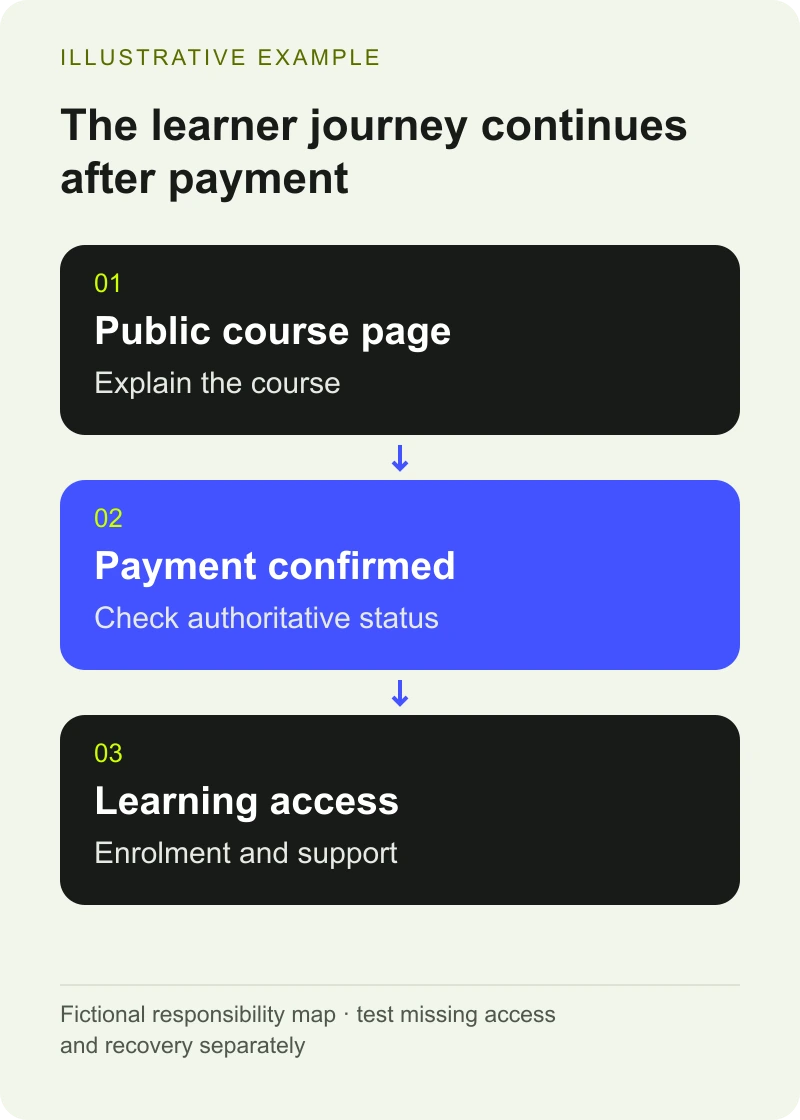
For a fictional short course, a responsibility map might look like this:
Part of the journey: Explain the course
System or team responsible: Public website and course owner
What must be clear: Format, suitability and access terms
Part of the journey: Record payment
System or team responsible: Chosen payment arrangement
What must be clear: Which purchase succeeded and what it covers
Part of the journey: Create or recognise the learner
System or team responsible: Account system
What must be clear: How the right person signs in
Part of the journey: Deliver lessons
System or team responsible: Learning platform or agreed service
What must be clear: Which material the learner can access
Part of the journey: Resolve a problem
System or team responsible: Named support team
What must be clear: Where staff can check the full history
The table describes responsibilities. A provider may cover several rows, but your team should still be able to explain them separately.
Want to apply this to your own website or app?
Tell me what you are working on and where it is getting stuck. I will help you turn the useful ideas into shipped work.
Treat payment and access as a connected process
Someone can pay successfully and still fail to reach a return page. An email can arrive late. A learner may use an existing account with a different address from the one they expected.
Agree how the system confirms a successful purchase and grants the right access. If you’re building a custom Stripe connection, Stripe’s published integration guidance explains why fulfilment must not depend only on the success page. A supported server-side event process is part of that design.
If the course provider owns the whole purchase route, ask it how staff can check a missing enrolment. You may not need custom code at all. You still need an answer for the person who has paid and can’t begin.
Repeated events should not create repeated enrolments. Failed or delayed payments should follow the arrangement the course and payment systems actually support. Put those cases in the acceptance checks before launch.
Test the awkward learner journeys
Use the provider’s test facilities and fictional learner information. Follow the experience from the public course page through payment, sign-in and the first useful lesson.
Include an existing learner buying another course. Check a forgotten password, a delayed confirmation and an interrupted return from checkout. Have staff demonstrate how they investigate a missing enrolment.
Agree what a refund, cancellation or expired access period should do, based on the organisation’s policies and obligations. Then verify that the chosen systems implement that arrangement. Don’t discover the access rules when the first support request arrives.
Check the learning content too. Captions, readable documents, navigation and controls belong in the assessment. A course can have an accessible sales page and a frustrating lesson player.
Keep the results with your project’s launch record so the support team can see what was checked.
Plan how staff keep the catalogue accurate
Assign an owner for course dates, availability, prices and descriptions. If the learning platform holds the authoritative information, decide how changes reach the public website.
Avoid maintaining conflicting catalogues without a review process. If the public page says a cohort is open after enrolment has closed, the learner has to solve a problem your systems created.
A structured CMS can help the public catalogue stay consistent. It still needs an agreed source and someone responsible for updates. The website brief template can capture the course types, systems, owners and test cases before a supplier estimates the work.
Choose the amount of website you actually need
You may be able to improve the course explanation and link to a learning provider that already works well. A custom account and payment connection should solve a defined problem, with room in the project for maintenance and support.
For a school, college or training team reviewing the public site, my education website work starts with the people using and maintaining it. Bring one course, its current purchase route and the support questions that keep coming back. That gives us something useful to improve.
Frequently asked questions
Can I still sell courses through a Webflow website?
Yes. Webflow can provide the public course pages, while an appropriate current arrangement handles purchases, accounts and learning. Decide those responsibilities explicitly. Don’t build a new plan around Webflow’s retired native User Accounts feature.
Is a membership tool the same as a learning management system?
Evaluate the functions you need rather than relying on a category name. Page access may be enough for some material. Progress tracking, assessments, certificates and teaching workflows need to be checked individually against the chosen service.
What matters most in the first course-selling test?
Verify that a successful purchase gives the correct learner the agreed access and that staff can resolve an interruption. Include the route back into the account, the first lesson and a clear support path. Test with the provider’s facilities and fictional information.