Automation comparison and interactive lab
n8n vs Zapier: a practical lead-routing decision guide
Choose n8n or Zapier around a real lead-routing workflow. Try the failure lab, model tasks versus executions and download a reusable acceptance test pack.
My starting recommendation is Zapier when a business team needs familiar app connections and can own a straightforward managed workflow. I would investigate n8n when the job needs more explicit data processing, custom API logic or control over hosting, and someone can own that complexity. These are decision criteria, not a universal winner.
The best comparison is the complete job you need done. A website enquiry should reach the correct CRM record, the right owner and a useful next step. It should also survive a repeated submission, an expired connection or a notification that fails after the CRM has already saved the lead.
This guide uses one fictional form-to-CRM-to-notification workflow, a working browser simulation and a downloadable test pack. The simulation demonstrates recovery designs; it does not execute either platform. Product facts were checked against official documentation on 10 October 2026.
n8n or Zapier? Start with the person maintaining it
| Decision | Zapier starting point | n8n starting point |
|---|---|---|
| Workflow ownership | A business operator can manage a familiar integration, with clear escalation when it breaks. | A technical owner can review transformations, APIs, execution state and recovery logic. |
| Hosting | Managed service; assess the vendor’s available controls against your needs. | Choose Cloud or investigate self-hosting. Hosting yourself adds operating responsibilities. |
| Custom logic | Check that the exact connector actions and supported code steps cover the workflow. | Investigate nodes, API requests and code when the process needs detailed transformations or branching. |
| Usage planning | Model the billable actions, special task rates and replay behaviour. | Model production workflow starts, including schedules and additional recovery workflows. |
| Failures | Define error handling and inspect how replay affects already completed actions. | Define retry behaviour, error workflows and how successful writes are reconciled. |
| Handover | Prove the intended operator can find a failed run and recover it. | Prove the owner can operate the workflow and, if applicable, the instance hosting it. |
Those starting points are my judgement about ownership. Both tools can support sophisticated work. A technically strong team can choose Zapier, and a business-led team can use n8n with appropriate support. The important question is who will understand the system when a lead does not arrive.
n8n offers a Cloud route as well as self-hosting. Its hosting documentation makes clear that running your own instance needs technical knowledge. Treat infrastructure, upgrades, backups, access and monitoring as part of the operating scope.
Write the workflow contract before choosing the connector
For the example, the input contains a stable submission ID, timestamp, name, work email, company, postcode and enquiry type. The output is an accepted lead with an owner, a notification and a recoverable delivery state. The CRM is the source of truth for the lead; the submission store records delivery progress.
A workflow can be green in the automation tool and still fail the business task. A successful API request that creates an unassigned record is one example. Include the owner and the response expectations in the acceptance check, not just the HTTP status.
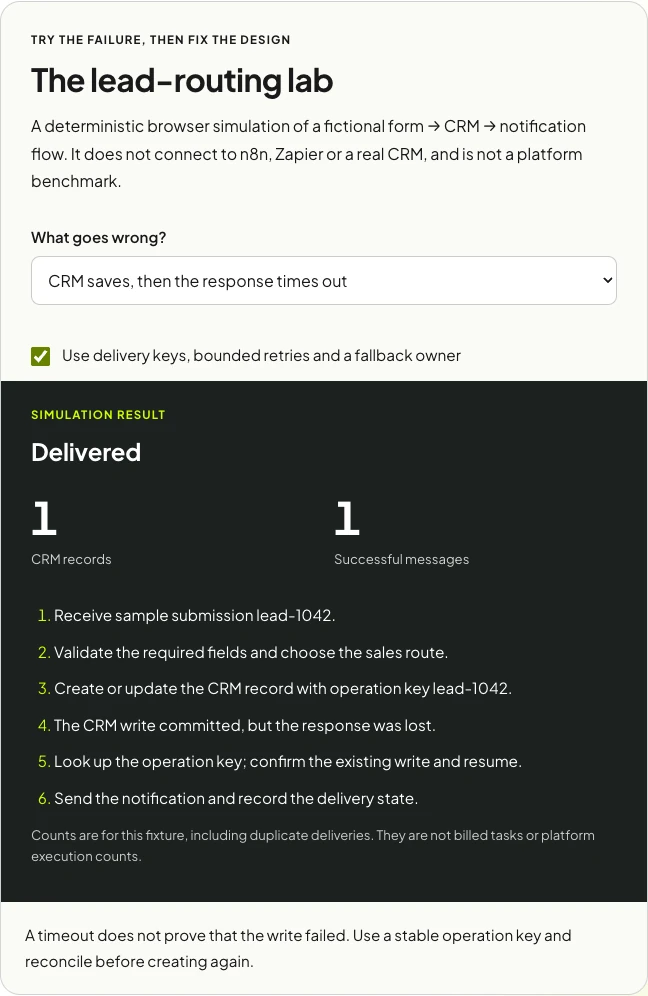
The lead-routing lab
A deterministic browser simulation of a fictional form → CRM → notification flow. It does not connect to n8n, Zapier or a real CRM, and is not a platform benchmark.
Simulation result
Delivered
- Receive sample submission lead-1042.
- Validate the required fields and choose the sales route.
- Create or update the CRM record with operation key lead-1042.
- The CRM write committed, but the response was lost.
- Look up the operation key; confirm the existing write and resume.
- Send the notification and record the delivery state.
Counts are for this fixture, including duplicate deliveries. They are not billed tasks or platform execution counts.
A timeout does not prove that the write failed. Use a stable operation key and reconcile before creating again.
Eight failures worth testing in either platform
1. A normal enquiry
Start with one known input and inspect all destinations. Confirm the fields, owner, record identifier and message. The baseline makes a later failure easier to understand; it is not enough to see that the trigger fired.
2. Duplicate delivery
A browser can submit twice, or a sender can redeliver an event. Keep a stable identifier for the submission and record whether its side effects have completed. Contact matching by email solves a different problem: the same person may legitimately send a second enquiry.
For production work, a simple read-then-write duplicate check can race when two deliveries arrive together. Use a destination’s supported idempotency controls or an atomic unique key/lock in a durable store, and test concurrent delivery. The browser lab models the intended outcome, not a production locking implementation.
3. A timeout after the write committed
A timeout is ambiguous. The CRM may have saved the record before the connection failed. Blindly repeating a create request can produce duplicates. Reconcile using the operation key or known record identifier, and only repeat work you can show is incomplete.
4. A temporary rate limit
A rate limit can be recoverable. Respect the service’s retry guidance, put a limit on attempts and elapsed time, and retain the original payload. If the retry budget is exhausted, alert an owner and provide a controlled recovery path.
5. Expired credentials
An authentication failure needs an access repair. Do not treat it as an indefinite retry queue. The useful alert tells the connection owner which system failed, where the retained submissions are and how to replay them after access is restored.
6. Notification failure after a successful CRM write
Keep the successful CRM step. Recover the message separately. If the operator replays an entire run, the workflow still needs protection against repeating already completed writes or notifications.
7. No matching owner
Routing rules will encounter requests outside their expected categories. Define a fallback queue, someone responsible for it and an escalation time. Otherwise, a correctly stored lead can remain invisible to the people who should act on it.
8. Missing or invalid fields
A malformed enquiry belongs in a review path with its original context, not in a loop that keeps failing the same validation. Decide which fields are mandatory for routing and which the team can collect later.
How I would implement the design in each tool
In Zapier
Choose the trigger that matches the form’s delivery mechanism, map and validate the fields, use the required CRM action, then notify the owner. Confirm the connector supports the exact search, update and ownership behaviour you need; the presence of a CRM in the directory does not prove every endpoint is available.
Add an explicit recovery route and inspect replay scope. Zapier documents task use for successful error-handler steps and repeated successful steps during a full replay. Use a controlled test account to confirm your particular flow’s side effects and task usage.
In n8n
Map the same contract into a trigger, validation and routing steps, the CRM write and notification. Nodes or API requests can handle the destinations; use code only where it makes the transformation clearer and maintainable. Separate delivery state from the visual workflow itself.
Use the documented error workflow and node error-handling options as building blocks. Define what a node retry means for the receiving API. An error workflow reporting a failure does not by itself establish safe recovery of partial success.
Neither outline is an import-ready production integration. Your CRM schema, credentials, data store, permissions and supported endpoint behaviour must determine the actual implementation. The downloadable tests below provide acceptance criteria you can reuse.
Tasks and executions are different units
Compare the workload before comparing subscription totals. Zapier’s documentation describes successful actions as tasks, with exceptions and special rates for some steps and products. n8n’s pricing is organised around production workflow executions. A node count and a task count are not interchangeable.
For an illustrative flow with 500 completed enquiries, three standard one-task actions per enquiry and ten additional full replays, the simple Zapier model is 1,530 tasks. For 500 n8n enquiry starts and 20 additional production workflow starts, the model is 520 executions. These are assumptions, not observed bills.
Model the units you need
Illustrative standard one-task action model: all enquiries finish successfully; each full replay repeats the same actions. No AI, extended code runtime or special-rate actions are included.
Zapier: (enquiry runs + full replays) × standard billable actions. n8n: enquiry runs + additional production workflow starts you expect.
A recovery step does not automatically start a new workflow. Count schedules, error workflows and separate reruns only when they actually start. Check each platform’s current inclusion, rate and retry rules before choosing a subscription.
Schedules, loops, error paths, special-rate actions and retries can change the model. Check the actual usage logs during a pilot and read the current Zapier pricing and n8n pricing for the chosen plan. I have avoided a fixed price table because currency, billing cadence, tiers and inclusions can change.
Also include the cost of ownership: implementation, monitoring, the person investigating failures, changes to connected APIs and any self-hosted infrastructure. A lower subscription line can still accompany a more expensive system to operate.
Download the workflow acceptance test pack
The CSV names the input or fault, expected CRM and notification outcomes, evidence to collect and owner. The JSON contains fictional payloads and fault descriptions, not platform credentials or importable workflows. The runbook gives the operator a repeatable way to investigate and recover a failed delivery.
- Create a sandbox record destination and a test notification channel.
- Implement one complete normal enquiry and inspect every output.
- Run the duplicate, timeout and partial-success cases before inviting live traffic.
- Record screenshots or execution links, actual task/execution usage and the recovery steps.
- Ask the future owner to recover a failure using the runbook, then fix anything they cannot follow.
Where an API cannot reproduce a particular fault safely, use a controlled stub in a test environment and document that limitation. Do not create destructive failures in a live sales process to complete the checklist.
When I would choose each
I would start with Zapier for a modest form-to-CRM handoff using supported actions, where a business operator can inspect and maintain the workflow. I would prove duplicate handling, ownership and recovery before adding more branches.
I would investigate n8n when transformations, custom API logic or hosting requirements make technical control valuable, and the team has a credible owner for that system. Cloud may be a better fit than self-hosting if operating an instance is outside the team’s capacity.
I would consider a small custom service if the core job needs durable queues, strict transaction boundaries or product-specific guarantees that become difficult to reason about in either workflow. The right answer can also be a smaller manual handoff while the volume is low.
For the sales journey around the automation, see my HubSpot and Chili Piper lead-flow teardown. If you need the handoff implemented and owned, see AI and automation work.
Official references and freshness
Checked on 10 October 2026. Plan limits, billing rules and available actions may change; confirm them during implementation.
- Zapier: how task usage is measured
- Zapier: current pricing and inclusions
- n8n: pricing and production execution units
- n8n: error handling
- n8n: self-hosting responsibilities
Frequently asked questions
Should I choose n8n or Zapier for website lead routing?
Start with supported connector actions, the data transformations you need and the person who will maintain the workflow. Zapier can suit a managed handoff owned by a business team. Investigate n8n when custom API logic or hosting control matters and a technical owner can support it.
Is the failure lab a real n8n or Zapier benchmark?
No. It is a deterministic browser simulation of delivery and recovery behaviour. It does not execute either platform or measure their speed, reliability or actual bills. Use its fixtures to test your own sandbox integration.
How do I prevent duplicate leads when an automation is retried?
Keep a stable submission or operation identifier and a durable record of completed side effects. Use supported idempotency controls or an atomic unique key, and reconcile ambiguous timeouts before creating another CRM record. Test simultaneous deliveries as well as sequential retries.
Are Zapier tasks equivalent to n8n executions?
No. The workload planner models successful billable actions for Zapier and production workflow starts for n8n. Special rates, schedules, error paths and replay behaviour can change actual usage. Validate your particular workflow against current plan rules and usage logs.
Is n8n always cheaper?
No. The units, plan and workload differ, and operating time matters. Model a representative month, include failure and replay usage and use the actual plan prices rather than multiplying a workflow’s nodes by a headline rate.
Do I need to self-host n8n?
No. There is a Cloud option. Choose self-hosting when its control is useful and the team can support the instance. Include infrastructure, upgrades, access, backups and monitoring in that operating decision.

.jpg)