Product decision guide
Web app vs mobile app: what should your business build first?
Choose a browser app, PWA or mobile release around the job people need to do. Use the decision tool, worked examples and downloadable test worksheet.
Start with a responsive web app when the useful job works well through a link and people need convenient access across phone and desktop. Investigate a mobile app when a required device capability, store distribution or a proven mobile-use pattern justifies the extra release and operating work. If offline use or installation might help, test a progressive web app before assuming an app store is the only route.
The distinction is not “web is basic, mobile is serious”. It is how people reach the product, which capabilities the job requires and what the team can maintain. A web app can be a substantial product. A store app can still be an interface nobody has a reason to open twice.
This guide helps decide the delivery format. For a separate choice between website and product frameworks, see the Webflow, Astro, Framer and Expo platform guide.
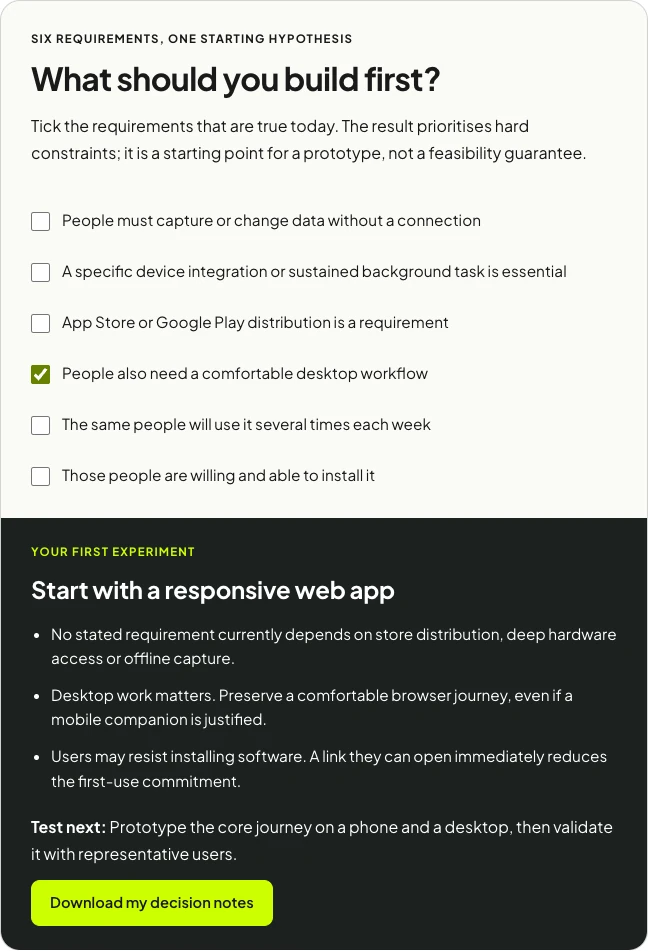
What should you build first?
Tick the requirements that are true today. The result prioritises hard constraints; it is a starting point for a prototype, not a feasibility guarantee.
Your first experiment
Start with a responsive web app
- No stated requirement currently depends on store distribution, deep hardware access or offline capture.
- Desktop work matters. Preserve a comfortable browser journey, even if a mobile companion is justified.
- Users may resist installing software. A link they can open immediately reduces the first-use commitment.
Test next: Prototype the core journey on a phone and a desktop, then validate it with representative users.
What is the difference between a web app, PWA and mobile app?
Responsive web app
A web app runs in a browser and lets people complete a task: book a service, approve a request, manage an account or work with shared data. Responsive design adapts that journey to different screen sizes. People can usually begin through a link rather than a store installation.
Progressive web app
A PWA adds capabilities such as installation and designed offline behaviour to a web product. Installation support and criteria depend on the browser and platform; MDN documents those requirements. Calling a site a PWA does not mean every feature works everywhere.
Mobile app
A mobile app is packaged for a mobile operating system and can use the capabilities available through its chosen SDKs and permissions. It may be built with native platform tools or a cross-platform approach such as React Native and Expo. A cross-platform mobile app is still a mobile release with signing, device testing and distribution work.
Expo’s distribution overview explains routes for sharing and releasing mobile builds. Treat distribution as an operational choice: a public store release, an internal test build and a browser deployment are different acceptance and maintenance paths.
| Question | Responsive web | PWA | Mobile release |
|---|---|---|---|
| How do people arrive? | A link, search result or shared URL. | A link first, with installation where supported. | An install through the chosen distribution route. |
| Desktop work? | Can support the same account and journey in a desktop browser. | Can retain the browser journey alongside installation. | May need a separate web interface for desktop tasks. |
| Offline work? | Not automatic; design the storage and recovery behaviour. | Can implement offline workflows, subject to platform behaviour and limits. | Still requires local data, sync, conflict and failure rules. |
| Device features? | Check the relevant browser APIs on the actual devices. | Uses supported web capabilities; installation is not a blanket native permission. | Check the SDK, permissions and operating-system restrictions. |
| What must be maintained? | Web release, data/API services, monitoring and browser compatibility. | Web responsibilities plus installation, caching and offline update behaviour. | Mobile builds, distribution, SDK/OS compatibility and supporting services. |
Five questions that change the decision
1. Is this an occasional task or a recurring habit?
A prospect completing one assessment request may prefer a link. A technician opening a work queue every morning has a stronger reason to keep an app close at hand. Frequency does not guarantee adoption, but it changes the case for installation.
Write the recurring trigger down: “start the shift”, “approve the weekly request”, “record a visit”. If you cannot name it, test whether the product has enough repeat value before committing to a store release.
2. Which device capability is essential?
“We need the camera” is not yet a complete reason to build native. What must the camera do, in which browser or operating system, with which file size, permissions and connection conditions? A simple photo upload and sustained background device interaction describe different tasks.
List the exact capability and run a small technical spike. If Bluetooth, scanning, location, background activity or another integration is central to the product, demonstrate it on the devices users actually have. Do that before designing the whole app around an untested assumption.
3. What happens without a connection?
Separate reading cached information from creating or editing records offline. The latter needs local state, a sync queue and a rule for conflicting changes. MDN’s offline and background guide describes relevant web building blocks; the complete business workflow still needs to be designed and tested.
An installed app does not make a failed sync disappear. The interface must distinguish a saved local draft from a record successfully delivered to the server. People need to know whether they can close the app, leave the site or hand the job to someone else.
4. Who also works at a desk?
A field team may capture visits on phones while operations schedules work and reviews records on a laptop. Forcing the scheduler into a phone-only interface can make the overall product worse even if the field app is good.
Plan one shared account and data model where that makes sense, then give each role an appropriate interface. A mobile companion and a web operations console can solve different parts of the same job without duplicating every screen.
5. Who owns the releases after launch?
Every format has ongoing work. Identify who approves changes, monitors errors, resolves account problems and updates dependencies. Mobile distribution adds its own release tasks; PWA caching adds its own update and recovery states.
I would rather see a smaller first release with a clear owner than two interfaces whose maintenance is assumed to happen somewhere else. The format choice should match the team’s ability to keep the product useful.
One job, three possible first releases
Consider a fictional workplace-services team. A technician needs to open an assigned visit, record a result and send it for review. Operations needs to approve that result. The same job can lead to three different releases depending on the actual requirements.
Release A: browser-first approval workflow
The team has a dependable connection during visits. The technician opens a link, signs in, records the result and submits it. Operations reviews the queue on desktop. A responsive web app is a reasonable starting hypothesis because no required step yet depends on store distribution or deep device integration.
The first proof: A technician and an operations reviewer can complete the whole visit-to-approval journey on representative devices. Test error states and permissions as well as the normal path.
Release B: offline-capable PWA
Some visits happen in areas with unreliable connectivity. The technician must read the assigned details, save a draft locally and deliver it after reconnecting. Installation may help repeat use, but the deciding requirement is recoverable offline work.
The first proof: Open a prepared visit, enable airplane mode, save a result, close and reopen where the target platform permits, then reconnect. Confirm the result syncs once. Have another reviewer change the same record to test the conflict rule. A cached screen alone does not pass this test.
Release C: mobile companion with a web review console
The technician needs a specific hardware integration that the web spike cannot support reliably, or store distribution is an explicit requirement. A focused mobile companion may now be justified. Operations can keep a web interface for scheduling and review.
The first proof: A signed test build completes the required hardware operation on the target devices, survives denied permissions and reconnects predictably. Document the distribution and update process alongside the journey.
The useful comparison: Each release should complete the same business job. Avoid giving one prototype a polished interface and another only a rough form, then declaring the polished one the better format.
Three assumptions I would challenge
“Push notifications mean we need a native app”
Web push exists on supported platforms. WebKit introduced it for Home Screen web apps on iOS and iPadOS 16.4, with permission requirements and platform conditions. See WebKit’s implementation explanation, then test the current devices and browser versions you need to support.
More importantly, identify the notification’s job. A reminder, a critical operational alert and a marketing message need different delivery expectations. A notification permission cannot guarantee that a person receives or acts on every message.
“One codebase removes the mobile work”
Shared code can reduce repeated implementation, but it does not remove device-specific testing, permissions, signing, store processes or interface decisions. Count the complete release path rather than only the amount of code shared.
“A web app will always be cheaper”
Not necessarily. Complex browser requirements, offline synchronisation, permissions and integrations can make a web product substantial. Compare two versions of the same scoped journey. A cheap browser prototype and a production mobile release are not comparable estimates.
A worksheet for the decision and first release
The decision worksheet records the requirement, whether it is essential, the target device, the evidence and the owner. The test plan covers a normal journey, permission refusal, connection loss, duplicate submission, conflicting edits and release ownership. The fictional visit workflow supplies examples you can replace.
- Name one useful job. Define the user, starting point and completed outcome.
- Mark hard constraints. Separate required hardware and distribution from preferences.
- Build the smallest representative prototype. Use believable data and the real interaction that could change the format decision.
- Run the difficult case. Test the weak connection, denied permission or conflict that the happy path hides.
- Observe representative users. Look for completion, confusion and repeat value rather than whether they say the interface looks good.
- Choose the release and owner. Record the assumptions, unresolved risks and the evidence that would make you reconsider.
The web app and MVP cost planner can help shape a budget once that first release is defined. For delivery, see web app development and mobile app development.
Technical references
Technical capability references were checked on 10 October 2026. Verify the actual browser, OS, device and SDK versions when you prototype.
- MDN: making PWAs installable
- MDN: offline and background operation
- WebKit: web push on iOS and iPadOS
- Expo: distribution overview
Frequently asked questions
Should my business build a web app or a mobile app first?
Start with a responsive web app when the useful job works through a link across phones and desktops. Investigate a mobile release when required device capabilities, store distribution or a proven pattern of repeated mobile use justifies the extra delivery and maintenance work.
Can a progressive web app work offline?
A PWA can cache selected resources and data for offline use, but that behaviour must be designed and tested. Decide which actions work without connectivity, how changes synchronise and what happens when data conflicts. Test the actual browsers and devices your audience uses.
Does a mobile app remove the need for a website?
Usually it does not. People may still need a public website for discovery, account help and purchase information, and staff may need a desktop interface. Scope these journeys separately rather than assuming the store app covers every audience.
What does the decision tool actually evaluate?
It prioritises device requirements and store distribution, then offline work, desktop needs, frequency and willingness to install. It proposes a starting direction from those inputs. It does not inspect your code, prove browser support or assess a particular hardware integration; validate the direction with a prototype.
Can a web app be used on a phone?
Yes, provided the interface and required capabilities are designed for the phone’s browser and conditions. Shrinking a desktop layout is not a complete mobile user experience. Test the important journeys with real content and devices.
Can I start with web and add mobile later?
Often, but plan the account, API and data boundaries so another interface can use them. Do not assume the whole browser interface will convert automatically into a mobile product. Budget for the new interface, release checks and ongoing support.
Is a PWA a replacement for every mobile app?
No. It is a delivery option worth checking against the required workflow. Browser support, hardware, background behaviour and distribution requirements can rule it out or make a focused mobile companion preferable.
Should we build web, iOS and Android together?
Only when you have evidence that all three are needed and the capacity to release and support them. Otherwise, test the core value in the most suitable first format and expand when a clear user need appears.

.jpg)