Your climate report needs a web page people can actually use
%20(1).avif) Written by Derrick Kityo
Written by Derrick KityoA useful climate report deserves more than an unexplained PDF link. Give readers the findings, boundaries, method and current version on a maintainable web page.
A carefully prepared climate report can become surprisingly hard to use once it reaches the website. The link says “Read more”, the file opens on a phone, and the reader has to hunt for the finding that brought them there.
The report may be sound. The publishing decision still needs work.
I’d give a substantial climate report its own web page: a useful account of what it covers, what it found and how to inspect the detail. The full document can remain available alongside it.
Give the report a stable home
Create a page whose address won’t depend on the uploaded file’s name. Link campaigns, product pages and emails to that page when it is the right destination.
Show the report’s title, publisher, publication date and the period or activity it covers. Explain the question it addresses before asking someone to download it. Make the document link explicit about the format and contents.
A stable page also gives later updates somewhere sensible to go. If a document is corrected, you can explain the change and identify the current version. You don’t have to rely on people noticing a different filename.
Think about old citations before replacing a file. Somebody may have linked to a particular edition for a reason. Agree whether earlier versions remain available and how the current page will distinguish them.
Write a summary that preserves the boundaries
The web page should explain the useful finding in ordinary language. Keep its scope close by: the period, geography, product or activity the report actually covers.
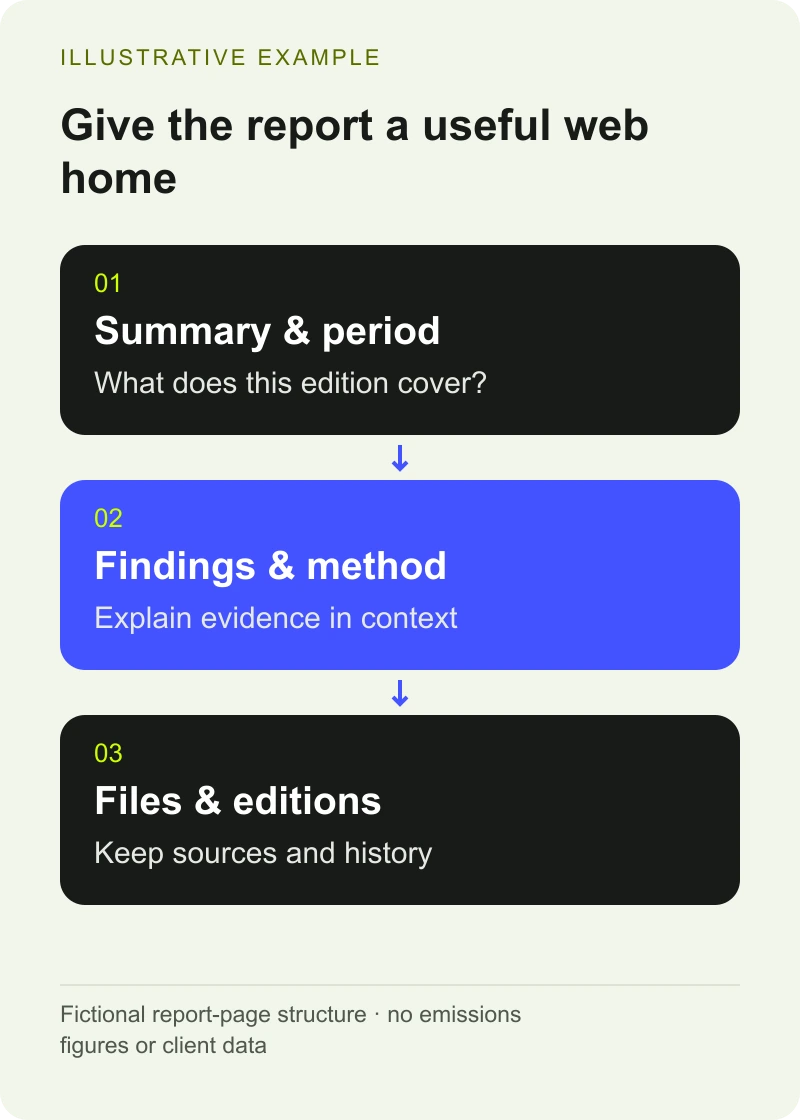
For a fictional example, imagine a report about emissions associated with one purchasing category during a defined reporting period. Its summary should identify that category and period. It shouldn’t quietly become a statement about the organisation’s whole environmental impact.
Where a result depends on assumptions, give readers a route to the method and explain the important limitations. A short summary can be honest about uncertainty without reproducing every technical paragraph.
Keep the summary and document under the same review process. The person approving the underlying report should be able to recognise its meaning in the web version.
Use HTML for the information people need to read
The government’s accessible-document guidance recommends publishing in HTML wherever possible and explains difficulties associated with non-HTML formats. That guidance is written for its publishing context; it’s also a useful practical reference when planning a report page.
HTML can let a reader navigate headings, follow links and use their browser’s display settings. It still needs to be built and written properly. Turning a PDF’s pages into images inside a web page doesn’t provide the same experience.
Use descriptive headings and real tables where the material calls for them. Keep the reading order clear. A compact report summary should work on a phone without horizontal hunting through a page designed for print.
There may be a good reason to retain a designed document or a fixed edition. Give it appropriate accessibility work too. A web summary is helpful, but it doesn’t make an inaccessible full report accessible by association.
Want to apply this to your own website or app?
Tell me what you are working on and where it is getting stuck. I will help you turn the useful ideas into shipped work.
Publish the meaning of a chart alongside the chart
A chart can show a pattern quickly, but its labels and colours shouldn’t be the only way to find out what happened.
W3C’s guidance on complex images explains the need for a fuller text alternative when an image carries substantial information. On a report page, that might include the main finding, the relevant relationships and a table of values where appropriate.
Describe what the chart supports. Don’t add a stronger conclusion in its caption than the report makes in the text. Keep units, dates and source notes together so a reused image doesn’t lose its context.
For approved public data supplied as JSON, my JSON-to-CSV tool can help prepare a tabular copy. It converts a format; it doesn’t verify figures, methodology or the accessibility of the final page. Those checks remain part of publication.
Make the evidence easy to follow
Use links that describe the destination. “Download the methodology” gives someone more information than several identical “Learn more” buttons.
Where the report supports a product claim, link the product page to the relevant explanation. Check that the statement and the report refer to the same scope and edition. If the report changes, the product wording may need another review.
An evidence page can be useful without collecting an email address first. If you do gate a report, decide which context must still be public for the claim on the referring page to make sense. Avoid making the basic explanation depend on a form submission.
Plan the next edition before the first upload
Assign an owner for the report page, source files and approval record. Agree who checks that links still work and what happens when the evidence is superseded.
A resource CMS can hold the report title, edition, date, summary, file and related pages as separate fields. That is easier to maintain than a single rich-text block containing several generations of downloads.
Keep publication changes visible. A corrected chart, a new reporting period and a replaced broken link are different changes. The reader should be able to tell whether the underlying evidence has changed.
My climate-tech website work includes public content and the publishing workflows behind it. If the report library is becoming difficult to maintain, bring one report, its source files and the pages that refer to it. We can work out a repeatable format from the real material.
Frequently asked questions
Should we stop publishing climate reports as PDFs?
Not automatically. A fixed document can serve a purpose, but it shouldn’t be the only useful route into the findings. Provide an appropriate web page and accessible document formats, with clear dates, scope and version information.
Is a report landing page just a short teaser?
It should give someone enough information to understand what the report covers and whether it answers their question. Include useful findings and important boundaries, then provide the full report and method. A sentence and a form may leave the reader unable to judge it.
Can a CSV replace an accessible chart description?
A table of values can be useful, but readers may also need an explanation of the pattern, relationships or conclusion conveyed by the chart. Publish the information appropriate to the chart rather than assuming a download supplies every part of its meaning.

.jpg)