An empty dashboard is still part of your product
%20(1).avif) Written by Derrick Kityo
Written by Derrick KityoTwo empty lists can need different actions. Try a working example, then review first use, filters, sample data and the difference between zero and unknown.
An empty dashboard is often the first real version of your product somebody uses. The account is new, the integrations aren't connected and none of the lovely sample projects from the design file exist. That screen needs as much thought as the busy one.
I like starting here because it forces a useful question: what can this person actually do next? A row of zeroes doesn't answer it. Neither does an illustration floating above a button called “Get started”.
The awkward part is that an empty list can mean several different things. You might have nothing yet. You might have plenty, with a filter hiding all of it. Those screens need different explanations and different actions.
Two empty lists, two different jobs
I made a small project-list example to put those cases next to each other. It's deliberately plain. There are no charts to distract from the decision.
On the first visit, the list genuinely has no projects. The useful action is to create one. In the other case, four fictional projects are saved, but they're all active and the view is set to archived.
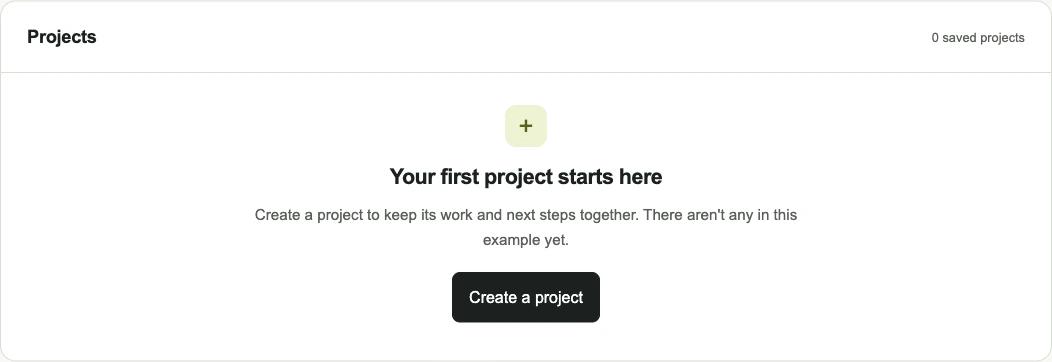
Both views show zero visible items. Asking someone to create a project in the second one would be a strange response. Their projects are already there. The useful action is to remove the filter.
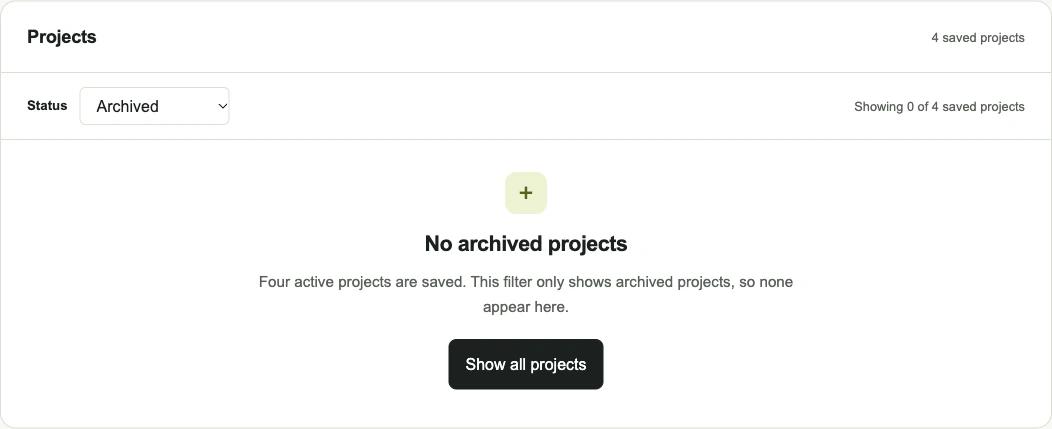
The example uses real in-browser state: creating a project adds an item, and changing the filter changes which sample items appear. It doesn't connect to a server. Anything you add disappears when you reload.
Explain the cause before offering a cure
“No projects” describes what the interface is showing. It doesn't necessarily describe what has happened.
Before writing the message, I'd ask the code a few more questions. Has the request finished? Did it succeed? Is this account allowed to see the result? Are filters active? Only then can the page explain the empty list honestly.
That matters because the wrong explanation sends someone towards the wrong action. Creating another record won't repair a failed request. Clearing a filter won't grant permission. Refreshing won't help someone who hasn't created anything yet.
Nielsen Norman Group's guidance on empty states makes the same underlying point: the interface should communicate its state and give people a useful route into the task. I find the distinction between causes more useful than collecting attractive empty-screen illustrations.
The demo only handles first use and a filter with no matches. Loading, failures and access rules need their own implementation. I wouldn't treat the demo's local array as a test of any of those.
The first item needs somewhere to go
A “Create a project” button earns its place by opening the next useful step. In the example, it reveals a name field. Saving puts the new project into the list and moves focus back to the project heading.
That is a small journey, but it has an end. The person can see what changed. If the button only opened another introduction or a tour of the navigation, the product would still be asking them to get ready.
I'd keep the first record small enough to create with information the person already has. If you need an integration, explain what it supplies and who can connect it. If an administrator must act first, give the person a clear request to make.
This can change the scope of a feature. A dashboard that looks complete in a mock-up might depend on data nobody has agreed how to collect. The empty version brings that dependency into the conversation early.
For an MVP, that's useful information. I'd rather find a missing input while sketching the first screen than after building a set of charts that can't show anything.
Want to apply this to your own website or app?
Tell me what you are working on and where it is getting stuck. I will help you turn the useful ideas into shipped work.
Sample data is an option with a cost
Sample data can help someone explore a product before connecting their own information. It can also make the first screen harder to interpret. Are these real customers? Will this item appear in a report? Can I safely delete it?
If you offer examples, label them and make their purpose clear. Decide how someone leaves the sample view and starts their own work. I'd keep sample records separate from real reporting and any action that could notify another person.
The demo has a separate scenario containing four fictional projects. They don't become the user's projects, and adding a project on the first-visit screen doesn't quietly merge it into that scenario.
Sometimes one useful sentence and a direct action are enough. The blank screen doesn't need to be filled just because the design looks sparse.
A zero in a chart can say more than you know
There's another empty state hiding inside dashboards: a metric shown as zero before the product has any data.
Zero orders and no order data aren't the same statement. Neither are no events this week and a tracking connection that hasn't started working. I'd make that distinction visible near the number, rather than leave a tooltip to explain it later.
The interface needs a state for “we don't have this information yet”. A connection status, coverage date or short explanation can tell someone whether they're looking at a result or waiting for an input.
I wouldn't put a fabricated trend into a new account to make the chart look finished. A clearly labelled preview can explain the eventual view without pretending it describes this account.
Test the page without the designer's data
A useful review starts with a genuinely new account and the permissions a new user will have. Keep the seeded demo account for another test.
Ask someone to make the first useful thing. Watch whether they understand what belongs on the page, why nothing is there and what the next action will do. If they need you to explain the data model aloud, that explanation may belong in the product.
Then try a filter that matches nothing. The existing records should remain intact, the active filter should be visible and the recovery action should work. On a narrow screen, keep that explanation close enough to the result that the two still read together.
Download the empty-state review worksheet
The worksheet also asks about loading, failed requests and access. Those are review prompts for your implementation, not features tested by the browser example.
If you're deciding what belongs in a first release, the web app versus mobile app article covers delivery choices. For the workflow behind the screen, see web app development.
Source and example notes
The browser example and screenshots were made for this article. The records are fictional, the storage is temporary and no client results are claimed. I checked the linked design guidance on 20 October 2026.
Frequently asked questions
What should an empty state explain?
Explain why the area is empty, what belongs there and the useful next action. A new account may need to create its first item. A filtered list may need a way to reveal existing items. Check the cause before choosing the message.
Is a loading state the same as an empty state?
No. Loading means the result isn't available yet. A completed request with no matching items is a different result. Avoid showing a definitive no-data message while the product is still finding out what it can display.
What should a no-results message say?
Describe the search or filter that returned nothing and offer a relevant recovery action. In the example, four active projects exist but the archived filter matches none. Showing all projects reveals them without creating anything new.
Does the example save projects to a server?
No. Added projects live only in the current browser page and disappear on reload. The four sample projects belong to a separate fictional scenario. The demonstration doesn't test a backend, permissions or failed network requests.

.jpg)