Can your team build the next Webflow campaign page without you?
Put a Webflow component library through a real handover task: longer copy, different proof, a new form and a mobile check. Includes an editable example and worksheet.
Give the person who'll own the site a campaign brief and let them build the next page. Ask them to change the headline, choose the proof, use a different form and check the result on mobile. That's a more revealing handover than watching you click through the component list.
A library can look organised and still be awkward to use. “Hero 04” might make sense to the designer who built it. The marketing person has to work out whether it's the right starting point, which fields they can change and when they need help.
I run Hilvy, so I care about the build after it leaves the designer's hands. The point of the exercise here is to find the missing decisions while there's still time to fix them.
Start with one plausible request
Here's a fictional workplace planning campaign. The first page has a short headline, three proof names and a project enquiry form. The next request is for an event page, with a longer headline and only one piece of proof.
That gives the owner a proper task without making them redesign the site. They need to make a few choices, recognise which parts are fixed and know how to check the result. If the instructions require them to guess a class name, I'd treat that as a gap in the handover.
Build the next campaign page
This original browser example has a few editable choices and a fixed design. It's a task fixture to reproduce in your Webflow project, not a Webflow editor or an importable library.
A calmer way to manage your next launch
Give the team one place to agree the work, responsibilities and next steps.
What stays fixed
Type, spacing, colour and the two form structures. Content, proof choice and section order are editable. The narrow view is a layout preview; it doesn't replace testing a published page on a phone.
Changes are lost on reload. Download the settings if you want to keep the example.
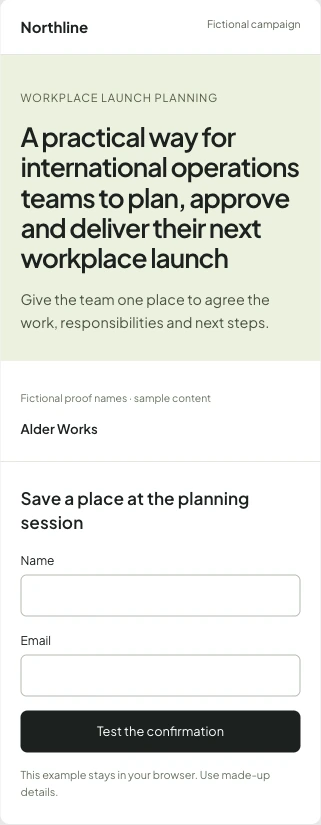
I kept the type, spacing and colours fixed in this example. You can choose the headline, proof, form and one of two section orders. That small set of choices makes the handover question easier to see: has the owner been given enough freedom to do the task?
The example isn't an importable Webflow library. Its JSON download records your choices for discussion. Recreate the task with your own components and the actual account the owner will use.
Give each editable choice a reason
A headline belongs in the campaign owner's hands. They need to change it without editing the component's structure. A spacing decision usually belongs in the shared design, because changing it on one page can make the next page harder to maintain.
Webflow separates the main component from its instances. Properties let an instance carry different values; slots hold other components; variants offer predefined design choices. The components overview explains how these parts fit together.
I'd name a property for the decision it controls. “Primary button label” is easier to follow than “Text 3”. A useful label can also expose an awkward assumption. If every page has a property called “Book a demo”, what happens when this campaign needs event registration?
| Part of the page | What I'd let the owner choose | What I'd keep in the shared design |
|---|---|---|
| Hero | Headline, explanation, action label and destination | Type scale, spacing and responsive layout |
| Proof | Approved examples and whether the section belongs | How different counts wrap and align |
| Form | A named, tested form choice | Fields, validation, destination and confirmation behaviour |
| Page sections | The order or sections the task calls for | The components that are available and their design rules |
This is a starting arrangement, not a universal rule. A small site might only need content editing. A team running frequent campaigns may need to assemble pages. Decide which job you're handing over before exposing every possible setting.
Content editing and page building are different jobs
In Webflow's current site roles, a Content editor can change content and component property values. The Marketer role can also build pages using existing components. Test with the intended role, rather than a designer account that makes everything look available.
Page building uses page slots for assembling approved components. A page slot and a component slot aren't the same thing. The page template also needs the right structure for the task. Giving someone access doesn't create a missing slot or a missing form choice.
I'd separate the request to make a new page from the authority to publish it. Agree how review works and check the account's actual permissions. Don't assume a role name tells you the whole release process.
Use content that makes the layout work harder
The longer headline in the example is deliberately less convenient than the first one. It's about international operations teams planning, approving and delivering a workplace launch. That's the sort of sentence a real brief might arrive with.
I'd try the long version before telling the copywriter the component is ready. Watch where the lines break, whether the explanation still feels connected and how far down the form moves. A character limit can help someone write within a known shape, but it shouldn't hide a layout problem.
Proof counts are another useful test. Three neat wordmarks make an easy screenshot. One short name, five different shapes or no approved example at all ask harder questions. Do you omit the section, use another layout or delay the page until there's something honest to put there?
The fixture uses made-up proof names so it can demonstrate spacing without suggesting an endorsement. In a real campaign, the owner needs to know which logos and claims they have permission to use. Keep that approval outside the component picker.
The form choice reaches beyond the page
Changing a project enquiry into an event registration is more than replacing the heading above the inputs. The team needs a destination, a confirmation and a way to trace whether the submission arrived.
The browser example only validates its displayed fields and shows a demo confirmation. It sends nothing. That lets you try the page safely, but it proves nothing about a CRM, email or booking system.
On the actual site, submit made-up details through each approved form and inspect the receiving record. Include an invalid submission and a repeat attempt. The lead-flow article goes through that part of the handover in more depth.
Watch the owner do it once
I'd give the owner the brief, the page template and the short handover notes, then let them work. Answer a question if they need it, and record what prompted the question. You want to learn where the build or explanation leaves them stuck.
- Create a campaign page from the agreed starting point.
- Change the headline and explanation using the exposed properties.
- Choose the approved proof and form, then arrange the allowed sections.
- Check longer copy, an empty section and the actual narrow-screen layout.
- Submit the form, inspect its destination and follow the agreed review process.
A successful run should leave evidence: the page, the receiving test record and a short note about anything the owner couldn't complete. Don't turn the session into a speed competition. Hesitation around publishing may be reasonable; uncertainty about which headline field to edit probably isn't.
Keep the handover checks with the site
The worksheet records the task, expected result, evidence and owner. The component notes describe this fictional page's editable choices and fixed parts. Adapt them to the library you've actually built.
If the owner needs to ask for a new section every time, I'd look again at the kinds of campaign they run. There may be a useful missing component. If every page needs a different layout, the assumption of one reusable campaign template may be wrong.
You can put the recurring work into a website backlog. For the components, permissions and owner training together, see Webflow training and handover.
Source notes
Webflow's component, page-building and role documentation was checked on 11 October 2026. The browser fixture and worksheet are original examples. They aren't evidence of a client outcome or a test of your Webflow workspace.
Frequently asked questions
How do I edit content in a Webflow component instance?
Use the properties exposed by the main component for values that should differ between instances. If a required choice is missing, review the main component with its designer. Structure and styles belong to the main component.
Can a Content editor build new pages from components?
The current Content editor role edits existing content and property values. The Marketer role also supports page building with existing components. Check the intended account and permissions before handing over a campaign-page task.
Is a page slot the same as a component slot?
No. Page slots allow approved components to be assembled within a page. Component slots are placeholders inside components. Webflow's page-building rules also govern where marketers can use nested slots.
What should I test before handing over a component library?
Ask the future owner to build a plausible campaign with their actual account. Include longer copy, different proof counts, an approved form, a narrow-screen check and the review process. Keep evidence of the page and the receiving form record.
Can I import the campaign example into Webflow?
No. The browser fixture and downloaded JSON record example choices for a handover discussion. They aren't a Webflow library or an import. Recreate the editing task with your own approved components.

.jpg)