Webflow Localization: what happens when the English copy changes?
One-time or continuous translation? Follow a source-copy update, protect independent translations and use a worksheet to review each locale before publishing.
Changing the English page doesn't always change its existing translation. In Webflow's one-time translation mode, the translated copy stays as it was. Continuous mode lets it follow the source. The choice matters as soon as somebody changes a service, a promise or the next step on the page.
A translated site needs a way to handle the second edit, and the third. I find that a more useful planning question than how quickly you can translate the first version. Who notices the change? Who can decide whether the French page should say the same thing? Who checks it before it goes live?
Webflow's 29 September 2026 translation update makes that choice more explicit. Here's how I'd work through it for a service page.
A small change with two different outcomes
I've made a fictional English and French example below. The English headline starts as “Websites for growing teams”. The edit changes that to “Websites for international teams” and gives the call to action a new job: discussing a new market.
Those messages are close enough that you could miss the difference at a glance. They're also different enough to send someone into the wrong conversation. A tidy layout wouldn't tell you that the French page was still describing the old offer.
Change the English copy
A small simulation with prepared English and French text. It shows the difference between two workflows; it doesn't call Webflow, translate your content or reproduce its interface.
Choosing continuous mode in this example replaces an independent French headline. In a real project, review existing translations before changing mode.
Websites for growing teams
Book a call
NL-SERVICE-01Des sites pour les équipes en croissance
Réserver un appel
NL-SERVICE-01Both example locales start with the same message.
Review state belongs to this exercise. Real publishing, translation triggers, exclusions and permissions need checking in your Webflow project.
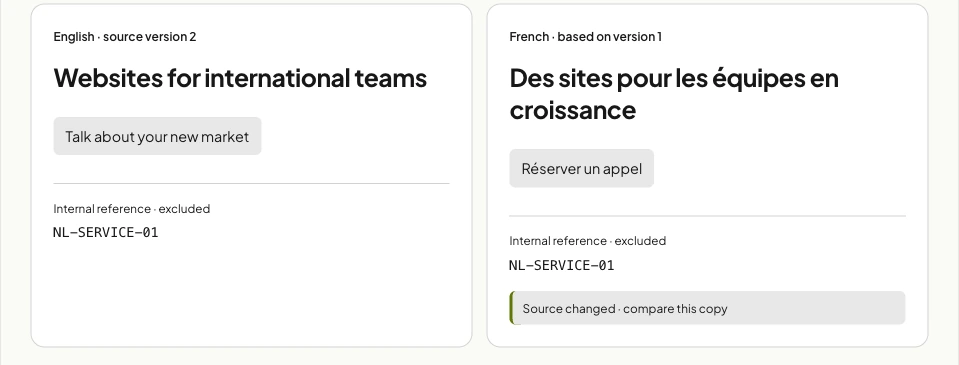
Try the English update first, then reset the example and choose continuous mode. You can also write an independent French headline in one-time mode. Switching to continuous shows the trade-off: the source-based version replaces that wording in this demonstration.
The exercise compresses the workflow so the difference is easy to see. It doesn't model translation processing time, publishing or every inheritance rule. Use it to agree what you want to happen, then reproduce that change on a test page in your own project.
Choose the mode around who owns the copy
| Question | One-time | Continuous |
|---|---|---|
| What happens to an existing translation after a source edit? | It stays in place. | It follows the source change. |
| Where does the team work? | Review and independently edit the translated copy. | Work from the source and translation settings for affected text. |
| What would I watch for? | A missed update. | A local choice being replaced. |
One-time is a slightly misleading name if you read it as a single run. New content can still be translated while the mode is enabled. An existing translated headline stays independent when its English source changes. Webflow explains this in its current translation documentation.
For a market-specific service page, independent wording may be exactly what you want. Perhaps the local team uses a different offer or needs a different explanation. I'd give that team an update queue, with the changed source and a named reviewer, so independence doesn't turn into silence.
For frequently updated shared information, continuous translation may be easier to manage. It still needs someone to read the result. “This follows the source” and “this is right for the audience” are two separate checks.
Continuous mode disables direct editing of affected text in the canvas, element settings and component properties. Switching to it can replace independently written translations. Review what's already there before changing the setting; don't use the live site as the place to discover what the switch does.
Keep reference codes out of translation
The example includes NL-SERVICE-01, a fictional internal reference. Translating that would add work without helping the reader. It's the kind of field I'd identify before running the first translation.
Webflow's exclusion rules cover page content and metadata, component content and props, and Collections or their fields. A page exclusion doesn't automatically describe every CMS field connected to that page. Review the separate scopes.
You can limit an exclusion by target language and by automatic or manually requested AI translation. It doesn't stop a teammate typing a value themselves. I'd record the reason for each exclusion alongside the field, so the next editor can tell an intentional code from forgotten content.
Exclusion also isn't a promise that the value will stay frozen. Inheritance and local overrides are separate concerns. If the source reference changes, test what reaches each locale in your project. Don't infer that from the unchanged reference in this small example.
Review the journey, not just the headline
A source edit should produce a short review task. Start with the change itself: the old wording, new wording and why it changed. That last part helps a reviewer decide whether to mirror it or keep a deliberate local difference.
Then read the page in the target language. A new headline might fit while a longer button label pushes the next section down. The form could ask for information the new offer no longer needs. Its confirmation could still describe the old next step.
I'd include the search title, description and social preview in the same pass. They describe the page before somebody reaches it. The link destination deserves a check too: translating a button label won't establish that the receiving page or team is ready for that market.
Translation can take time to finish, and translating a CMS item doesn't publish it. Check the translated result and the intended publishing state separately. The Collection localisation documentation covers locale-specific content and publishing status.
For the first update, I'd keep one owner for the source edit and one reviewer for each target locale. A small team might use the same person for both roles. What matters is that the responsibility is visible, including when someone is away.
Use the next real edit as a rehearsal
The CSV has a worked fictional source change, review checks and blank results columns. The runbook gives you a repeatable sequence. Neither file changes Webflow settings.
- Choose a test service page and note its translation mode and current local wording.
- Change one meaningful piece of source copy. Keep a copy of the old version.
- Use the documented workflow to let translation run, then inspect the target page.
- Compare the offer, labels, form, metadata and link destinations. Record any deliberate differences.
- Ask the future owner to repeat the update using the worksheet, including the publishing review.
If the page is ready but nobody knows who can approve the French copy, that's the issue to sort out before adding another language. For the ongoing work around these changes, see Webflow maintenance. For planning the people and content first, the website brief template has room for both.
Source notes
I checked the linked Webflow documentation on 11 October 2026. The workflow example is my own, with prepared French strings and fictional service content. Translation controls and plan availability can change, so confirm the settings in your project when you use the worksheet.
Frequently asked questions
Does Webflow update a translation when the source copy changes?
It depends on the mode. One-time leaves an existing translation in place after a source edit. Continuous updates translated text from the source. Choose according to whether the target language needs independent wording, then review the result.
Does one-time translation stop translating new pages?
No. New content can still be translated while one-time mode is enabled. The distinction is that later source changes leave existing translations alone. One-time doesn't mean a single site-wide run that switches itself off.
Can continuous translation replace a manually written translation?
Yes. Switching to continuous can replace independently written translations. Direct editing of affected text is restricted in that mode. Review existing local copy before changing the setting.
Can I exclude an internal reference from AI translation?
Webflow supports exclusions for page content and metadata, component content and props, and Collections or fields. Check the scope, target language and translation trigger. An exclusion doesn't stop a teammate typing a value themselves.
Does the translation example connect to my Webflow site?
No. It uses prepared English and French strings in your browser. It demonstrates a workflow choice, without translating your content or publishing anything. Reproduce the worksheet checks on a test page in your own project.

.jpg)