Free template and worked example
Website brief template: a completed example and free download
Write a website brief that a team can actually build from. Download the editable Word template, see a completed B2B example and create your own brief.
A website brief should explain who the site is for, what people need to do, what the team will deliver and how everyone will recognise a successful launch. It should also make the unknowns visible. You do not need to decide every font, component or technical detail before asking for help.
I find the most useful starting point is a complete visitor journey. “We need a modern website” is difficult to price. “An operations manager can check our coverage, request an assessment and reach a named sales owner” gives design, content and development a shared job.
This guide includes an editable website design brief, a completed fictional B2B example, an acceptance-check spreadsheet and a small builder. Use whichever fits the way your team works. There is no email gate.
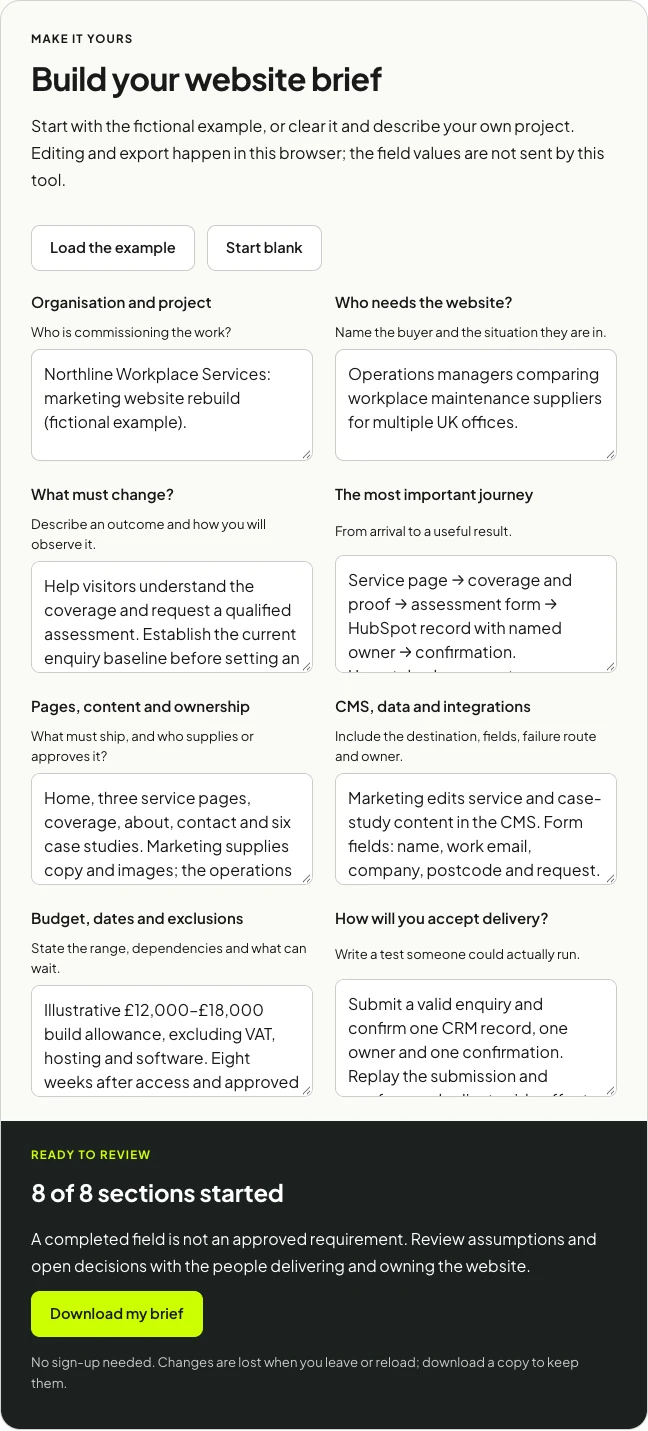
Build your website brief
Start with the fictional example, or clear it and describe your own project. Editing and export happen in this browser; the field values are not sent by this tool.
Ready to review
8 of 8 sections started
A completed field is not an approved requirement. Review assumptions and open decisions with the people delivering and owning the website.
No sign-up needed. Changes are lost when you leave or reload; download a copy to keep them.
A completed brief: Northline Workplace Services
Northline is a fictional supplier of workplace maintenance services. Its marketing team wants a clearer website, while operations needs enquiries to arrive with enough context to route them. The example is illustrative, including the budget and timeline; it is not a client case study or a market-price survey.
The brief in one sentence: Rebuild the marketing site so an operations manager can understand the service, check coverage, evaluate relevant proof and request an assessment that reaches the correct owner.
That journey exposes work a visual brief can miss: coverage logic, form fields, CRM mapping, duplicate delivery, fallback ownership and the content needed to establish trust. It also shows which attractive extras can wait.
What should a website brief include?
1. The business situation and the person making the decision
Explain why the work is happening now. Perhaps the business has changed, the current site hides an important service, or marketing cannot publish without developer help. Name the person who can approve scope and resolve competing requests.
For Northline, the situation is a confusing service proposition and inconsistent enquiry handoffs. The operations lead approves service claims; marketing owns the content; one project sponsor signs off the release. A list of stakeholders without decision rights would leave the important part unresolved.
2. The audience and the task they arrive to complete
“Businesses in the UK” is too broad to guide a page. Describe the buyer, their context, the questions they ask and what would make them hesitate. Separate a returning customer’s support need from a new prospect’s comparison task.
Northline’s primary reader is an operations manager comparing suppliers for multiple offices. They need coverage, service boundaries, relevant proof and a clear next step. Existing customers still need a visible support route, but the first release does not include a customer portal.
3. Outcomes and a measurement plan
Choose a useful business outcome, then identify observable events. A form completion is a leading indicator; a qualified assessment request is closer to the commercial goal. Include who reviews the enquiries and what makes one qualified.
If you do not know the current baseline, say so. Northline’s brief requires establishing it before promising an improvement percentage. Inventing a conversion target can make a brief look precise without making it more useful.
4. The main journey, including failure
Describe the route from arrival to completion, and what happens when a step fails. For an assessment enquiry, the visitor needs a clear confirmation only after the system has accepted the request. The team needs a recoverable submission if its CRM is unavailable.
Ask where the authoritative record lives. A form provider, inbox and CRM can each hold a copy; decide which system the team should trust and how they will reconcile a missing handoff. You do not have to design the complete integration at briefing stage, but the responsibility belongs in scope.
5. Page types, content and editorial ownership
List the pages and the reusable types of page. Ten case studies may use one template; three service pages may share one structure. This gives a better picture of the build than a page count alone.
Northline needs a home page, three services, coverage, about, contact and six case studies. Marketing supplies copy and images. Operations reviews claims. The brief identifies who signs off each template and who enters the initial content.
6. Brand direction and references with a reason
Share existing brand files and a few examples, then explain what is useful about each. “I like the way this pricing page explains the options” is actionable. “Make it like this competitor” leaves the team to guess whether you mean the layout, tone, features or visual identity.
A brief can describe desired qualities without prescribing a finished design. Clear service hierarchy, readable mobile pages and recognisable proof are useful requirements. The specific composition can be explored during design.
7. CMS, integrations and data rules
Name the systems that must connect, the data that moves and the people who maintain access. Include the editing tasks the team needs to perform: publish a case study, update coverage, change a service introduction or retire a page.
Northline’s form collects name, work email, company, postcode and request. The CMS lets marketing publish service and case-study content. HubSpot holds the lead record. The brief asks for a stable submission identifier, a failure alert and a fallback queue for unmatched areas.
8. Existing content, URLs and migration
Provide an inventory of the current pages, downloads and forms. Mark what should be retained, rewritten, combined or retired, and name the owner of that decision. If URLs will change, include the redirect map and a way to test it.
This is different from requesting “SEO included”. A migration has concrete inputs and outputs. The developer needs the current URLs; the content owner needs to approve the destination pages; the release needs checks that useful old links still lead somewhere sensible.
9. Accessibility and the devices that matter
Describe the people and conditions the core journey must support. Ask for keyboard access, clear form labels, useful error messages, legible contrast and a mobile layout that works without horizontal scrolling. Agree which devices and browsers the team will check.
If a contract requires a particular accessibility standard or audit, put that requirement and the acceptance method in the brief. A general intention to be accessible and a formal assessment are different scopes of work.
10. Budget, dates and dependencies
Share a budget range and what it covers. Separate the build from hosting, paid software, ongoing management and tax. A budget gives the team permission to propose a smaller, coherent first release.
The Northline example uses an illustrative £12,000 to £18,000 build allowance and an eight-week delivery window after access and approved content. Those are assumptions for this example. The real date depends on the scope, people and inputs, so “eight weeks from today” would describe a different commitment.
11. Exclusions and unresolved choices
Write down what will not be delivered in this release. Northline excludes a portal, payments and a rebrand. That makes the marketing-site work easier to discuss without treating those excluded features as permanently impossible.
Keep a decision register with the question, owner, deadline and consequence of delay. An honest “CMS choice to be confirmed after an editing demonstration” is better than pretending the platform is settled.
12. Acceptance, handover and ongoing ownership
Define how the team will accept delivery. Then name who owns publishing, software accounts, domain access, monitoring and future changes. Ask what documentation and training the handover includes.
This is where a brief becomes a working agreement. A design approval alone does not establish that the form reaches the right person, that content can be edited or that a failed submission can be recovered.
Turn vague requirements into acceptance checks
| Vague request | Observable acceptance check | Reviewer |
|---|---|---|
| “Easy to update” | Marketing creates, previews and publishes a case study using the agreed fields without editing code. | Content owner |
| “Integrate the form” | A valid submission creates the intended CRM record, owner and confirmation; a replay does not repeat side effects. | Operations owner |
| “Works on mobile” | The key journey can be completed on the agreed phone sizes using touch and without horizontal scrolling. | Project reviewer |
| “Keep our SEO” | The agreed old-URL sample resolves to the approved destinations; important new pages have consistent canonical URLs and are indexable. | Search / delivery owner |
| “Track enquiries” | A successful submission records the agreed completion event; validation errors and repeated clicks do not inflate that event. | Measurement owner |
| “Ready to hand over” | The named owners can access the CMS and service accounts, find the documentation and perform a supervised content edit. | Project sponsor |
The downloadable CSV adds fields for the test steps, expected result, evidence link, reviewer and status. Start with a few important checks and expand them with the delivery team. A hundred generic ticks can hide the one handoff that actually matters.
How to use the template with an agency or developer
- Fill the known decisions. Describe the audience, outcome and core journey first. Mark uncertainty rather than writing around it.
- Attach the source material. Include existing URLs, content, brand assets and useful examples. Grant account access through the appropriate account controls when work begins.
- Ask for assumptions alongside the quote. Compare what each proposal includes, depends on and excludes. A lower total may cover a different release.
- Review one end-to-end example. Walk through a service enquiry or publishing task together. Use that conversation to discover missing scope.
- Agree the first release and acceptance checks. Move later requests into a separate backlog so they remain visible without silently changing the launch.
Once the project is understood, the website and product backlog template helps prioritise the work that follows. The worked website audit is useful when you need evidence from the current site before deciding what to rebuild.
Questions people ask about website briefs
How long should a website brief be?
Long enough to expose the important decisions, short enough that the people delivering the work can actually review it. A concise main brief with linked inventories and examples is often easier to use than one large document containing everything.
Do I need to pick the platform first?
Only if it is a real constraint. Name the editing, hosting, integration and ownership requirements first. A developer can recommend a platform against those requirements and demonstrate the trade-offs.
Can I use this for a redesign?
Yes. Give the current URLs, explain what must be preserved and add migration and launch responsibilities. Separate design changes from new content, data work and integrations so the scope remains understandable.
Is the brief the same as a contract?
This template describes the project; it does not replace an agreed proposal, statement of work or contract. Use it to make the delivery scope and open decisions clear before those documents are finalised.
What if I cannot answer all the questions?
Send what you know and flag the decisions you need help making. Discovery work can resolve those questions. The useful distinction is between something genuinely unknown and something everybody assumes someone else has decided.
If you want help turning your brief into a deliverable release, see my website development work or send me the project context. For another independently published starting point, the Digital Culture Network offers a website brief template geared towards cultural organisations.
Frequently asked questions
What should a website brief include?
Include the audience, the job visitors need to complete, business goals, page and content scope, integrations, ownership, budget, timing and acceptance checks. Separate agreed requirements from questions the delivery team still needs to investigate.
Can I edit the website brief template in Word?
Yes. The blank template and completed fictional example are editable Word documents. The browser builder also creates a Markdown download using the information you enter. Neither route requires an email address.
How detailed should a website design brief be?
Give enough detail to agree scope and test a successful launch. A complete visitor journey and named content owners are more useful than prescribing every visual detail before discovery. Record assumptions so a team can price uncertainty explicitly.
Is the completed website brief a real client case study?
No. Northline is a fictional B2B example that demonstrates how to write requirements and acceptance checks. Its budget, company details and timeline are illustrative rather than observed client results.

.jpg)