Your careers page shouldn’t advertise jobs you’ve already closed
%20(1).avif) Written by Derrick Kityo
Written by Derrick KityoA closed vacancy should stop looking open on the website. Use the hiring system as the source and agree updates, removals and failure handling.
Closing a role in the hiring system should mean applicants stop seeing it as available on the website. If someone has to remember a second update in the CMS, the process has an obvious weak point.
For a small climate-tech team, that extra task competes with everything else happening around a recruitment round. The applicant only sees a role that looks open and an application that goes nowhere.
I’d review the connection between the website and the hiring system before redesigning the job cards.
Decide which system owns the vacancy
Give the role one authoritative source. If the recruitment team maintains titles, locations and availability in its hiring platform, the website should use that information or link to it.
Keep editorial content separate where it has a different owner. The website can explain the company, team and working environment without becoming another place to manage the status of each vacancy.
For Altruistiq, I connected the careers section to Lever’s job feed and removed roles when they were archived. That delivered work is described on my climate-tech website page. It’s a specific connection, rather than a claim that every recruitment integration works the same way.
The useful starting question is simple: after a recruiter changes a role, what needs to happen before the public page reflects it?
Choose between a link, an embed and a feed
A link to the provider’s hosted jobs page may be enough. It keeps the application journey with the system that owns the vacancy and can reduce the amount of custom work the website needs.
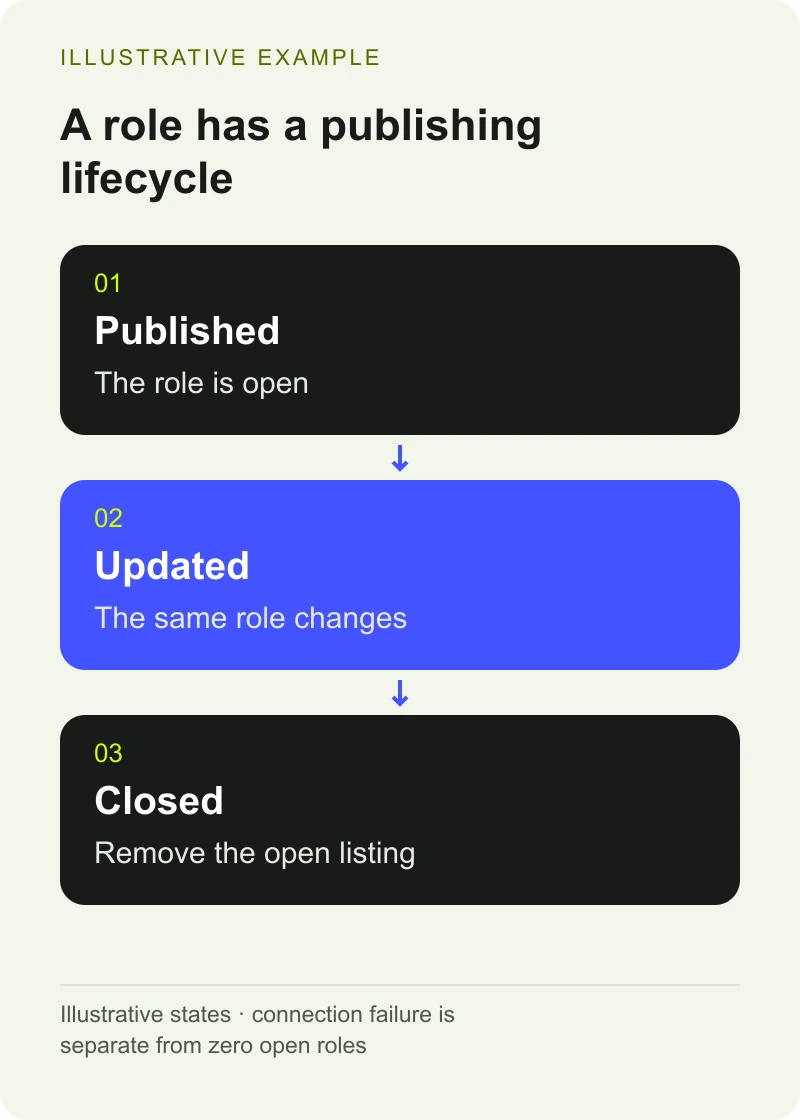
A feed can make sense when the website needs its own listing, filters or consistent page layout. It also creates responsibilities for fetching, publishing and removing information. Agree those responsibilities before treating a feed as a small decorative addition.
Lever’s Postings API documentation explains its public listing capabilities. It states that jobs in the published state are publicly viewable and other states are hidden from the jobs API. The documentation also distinguishes global and EU instances. Check the arrangement used by the organisation rather than copying a demo URL.
If you’re considering an embed, test what the provider currently supplies and how it behaves on your site. Check mobile layout, keyboard use, the application route and who can change the styling. Don’t assume every advertised integration offers the same features.
Plan what happens when a role disappears
Use the source’s stable identifier to recognise the same role across updates. A changed title shouldn’t automatically become a second vacancy.
Then agree the removal behaviour. If a complete, successful refresh no longer includes the role, the website needs to stop presenting it as open. If it has its own detail page, decide what that page should explain and where an applicant can go next.
An empty response and a failed request need different handling. A connection problem shouldn’t tell applicants the company has stopped hiring. A missing page of results shouldn’t close roles that simply weren’t fetched.
The implementation needs to account for the provider’s pagination and filters. The team reviewing the scope should understand the consequence: the website must know whether it received the complete set of vacancies it intended to publish.
Want to apply this to your own website or app?
Tell me what you are working on and where it is getting stuck. I will help you turn the useful ideas into shipped work.
Agree how current the website needs to be
Set a refresh arrangement with the hiring team. It might run when the site builds, on a schedule or through another supported mechanism. Each choice affects how quickly an edit reaches the public page and what needs monitoring.
Avoid promising instant updates unless the whole route delivers them. Tell the team how to trigger or request an urgent correction and who can check whether it arrived.
A failed refresh should be visible to somebody. Record when the last successful update happened and keep enough information to diagnose the problem. Decide how long old information remains useful before the website needs a different message or a link to the authoritative jobs page.
Those are project decisions. There isn’t one sensible refresh interval for every company or hiring process.
Test a recruitment round, including the end
Use test vacancies or another provider-approved approach. Agree the following checks with the recruitment and website owners:
- Publish a role and confirm the right title, location and application link appear.
- Change an existing role and confirm it updates without creating a duplicate.
- Close the role and confirm it is no longer advertised as open.
- Interrupt the connection and check the website and staff notification behave as agreed.
- Check a valid empty list separately from a connection failure.
Keep the test evidence with the handover when the connection is built.
Follow the application link too. A working list is little help if the final button points to an old vacancy or an incorrect provider instance.
Leave recruitment with a process it can use
Document which fields the website uses, which system owns them and how updates reach the site. Show the recruitment team a normal update and explain the support route for a mismatch.
Keep the company story under editorial control. A feed can keep vacancies current while staff maintain benefits, team information and useful context around them. Those pages still need review when the organisation changes.
If you’re already reviewing the wider site, the climate-tech publishing checklist helps identify content owners and connected workflows. For continuing support, website management can include an agreed review of the connections the team relies on.
Bring the current careers page, the hiring provider and an example of an update that doesn’t reach the site cleanly. That’s a more useful starting brief than “we need an integration”.
Frequently asked questions
Do we need a custom careers integration?
Not necessarily. A link to the hiring provider’s hosted page may meet the need. A custom listing is useful when you need your own presentation or filters and can support the refresh, removal and failure behaviour it introduces.
Why can’t we remove a job whenever it is missing from a feed response?
The website needs to know that the response is complete and successful. Pagination, filters or a failed request can produce an incomplete list. Treat an agreed complete refresh differently from an interrupted connection.
Who should own job details after the connection is built?
The recruitment team should maintain the agreed source of vacancy information. Name a website or technical owner for the connection, monitoring and corrections. Document where editorial careers content is maintained separately.

.jpg)